-
dataBinding - [안드로이드] [kotlin] [viewBinding] [mvvm] [bindingAdapter]안드로이드 2023. 8. 22. 01:19
Databinding이란?
(프로그래매틱 방식이 아니라 선언적 형식으로 레이아웃의 UI 구성요소를 앱의 데이터 소스와 결합할 수 있는 지원 라이브러리입니다.)
기존 findViewById를 사용하여 view를 가져온 후 명령하는 방식이 아닌, xml에서 view에 데이터를 연결하여 반응하게 하는 방식이다.
ViewBinding과의 차이
기존 findViewById로 트리구조로 되어있는 view들을 탐색해 view를 얻어오는 방식 대신 viewBinding을 이용하면 view를 바로 참조할 수 있다.
dataBinding은 viewBinding의 기능을 모두 사용할 수 있고, 추가적으로 xml에서 view에 데이터를 바로 할당할 수 있다.
MVVM (Model View ViewModel)
mvvm이란 View가 Model을 참조하여 화면을 구성하고, View의 이벤트가 ViewMoedel의 함수를 호출하여 Model의 데이터를 바꾸는 디자인 패턴이다.
view는 ViewModel에 있는 Model을 참조해 자동으로 화면에 반영할 뿐, 외부의 명령에 의해 변화하지 않는다.
즉, ViewModel에 있는 Model을 구현한 LiveData를 View에 dataBinding하여 view가 model을 참조하게 하고
view의 onClick에 viewModel의 함수를 dataBinding하여 Model의 데이터를 바꾸게 하면 Mvvm 패턴을 구현했다고 할 수 있다.
세팅 방법
모듈 단위의 buildGradle에 dataBinding 세팅을 추가한다.
android {
    ...
    dataBinding {
        enabled = true
    }
}
예제
- 사람의 이름, 나이를 나타내는 Model을 만든다.
- 이때 Int형은 textView에 dataBindin할 수 없기 때문에 age를 String으로 반환하는 getter 또는 함수를 만든다.
class PersonModel {
    var name: String = "name"
    var age: Int = 0
    fun ageString(): String = age.toString()
}
- PersonModel을 보유하고 가공하는 ViewModel을 만든다.
- 이름 및 나이는 person이라는 변수에 LiveData로 저장한다.
- 이름 및 나이를 바꿔주는 inviteAnotherPerson 함수를 만든다.
import androidx.lifecycle.MutableLiveData
import kotlin.random.Random

class PersonViewModel {

    val person = MutableLiveData(PersonModel())

    fun inviteAnotherPerson() {
        person.value = PersonModel().apply {
            name = getRandomName()
            age = getRandomNum(0, 100)
        }
    }

    fun getRandomName(): String {
        val length = Random.nextInt()%10
        return StringBuilder().also { sb ->
            repeat(length) {
                sb.append(getRandomChar())
            }
        }.toString()
    }

    private fun getRandomChar(): Char{
        return getRandomNum('a'.code, 'z'.code).toChar()
    }

    private fun getRandomNum(min: Int = 0, max: Int = 100): Int {
        return min + (Random.nextInt() % (max-min+1) )
    }
}
- 기존 레이아웃을 태크로 감싼다.

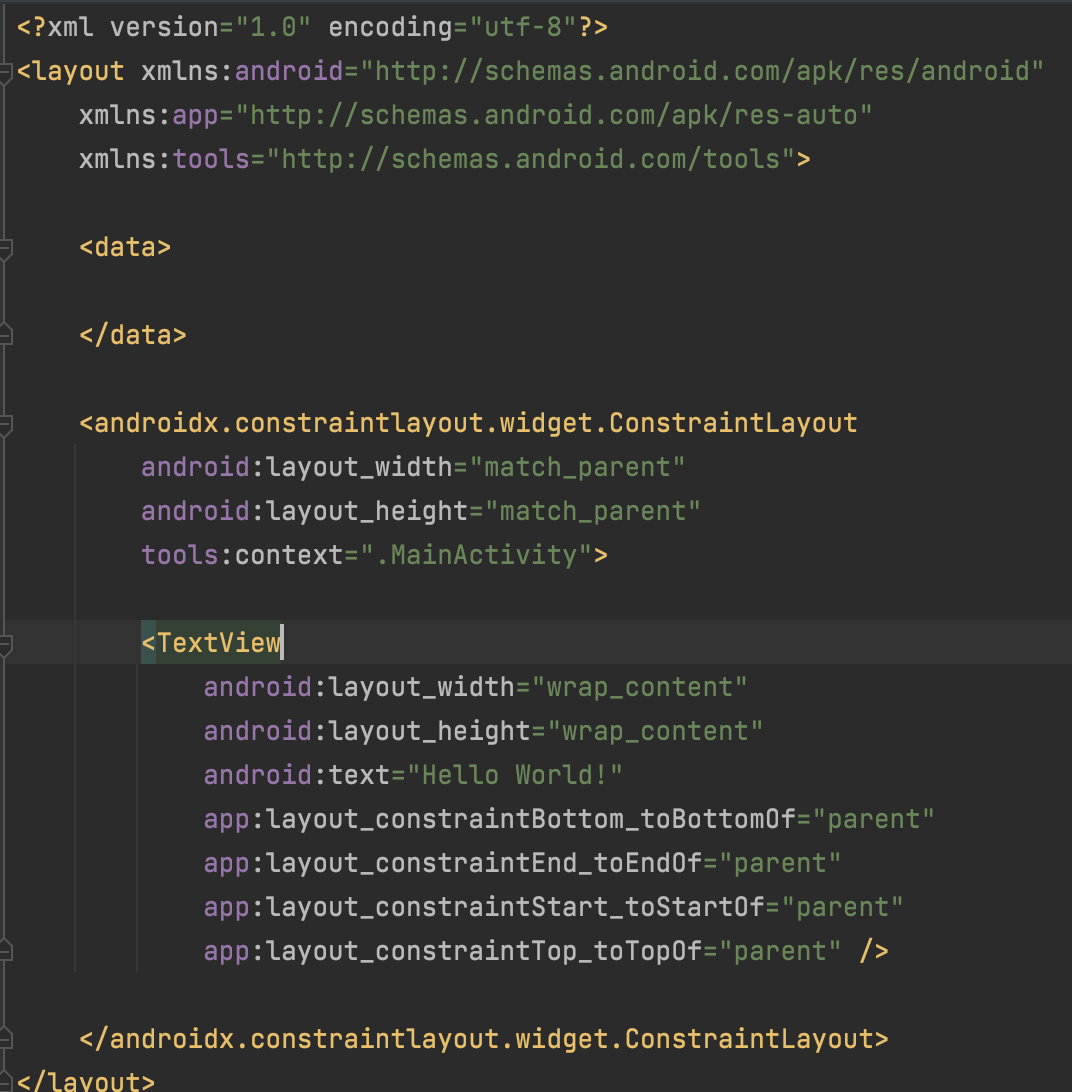
- <data> </data> 태그 안에 사용할 viewModel을 불러오고 dataBinding으로 연결시킨다.
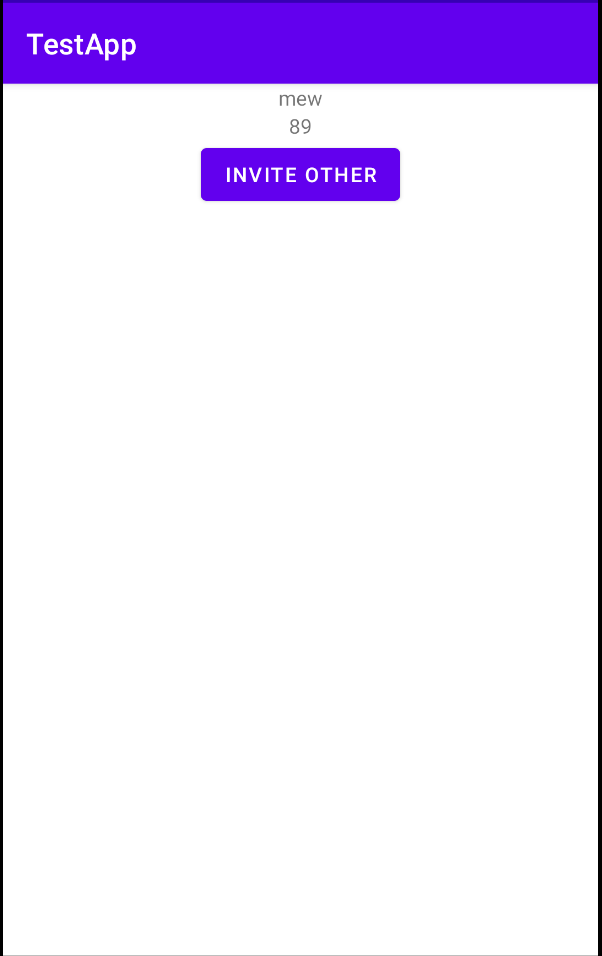
- 이름 및 나이를 표출하기 위한 textView 2개를 선언한다.
- 다른 사람의 정보를 띄우기 위한 버튼 하나를 선언한다.
- 버튼을 누르면 peron: LiveData<PersonModel>의 값이 바뀌게 한다.
- 각 textView는 person 안에 있는 정보를 dataBinding하게 하여, person이 값 변화를 알리면 ui에 반영되게 한다.
<?xml version="1.0" encoding="utf-8"?>
<layout xmlns:android="http://schemas.android.com/apk/res/android"
    xmlns:app="http://schemas.android.com/apk/res-auto"
    xmlns:tools="http://schemas.android.com/tools">

    <data>
        <variable
            name="viewModel"
            type="com.example.testapp.PersonViewModel" />
    </data>

    <androidx.constraintlayout.widget.ConstraintLayout
        android:layout_width="match_parent"
        android:layout_height="match_parent"
        tools:context=".MainActivity">

        <TextView
            android:id="@+id/nameTextView"
            android:layout_width="wrap_content"
            android:layout_height="wrap_content"
            android:text="@{viewModel.person.name}"
            app:layout_constraintEnd_toEndOf="parent"
            app:layout_constraintStart_toStartOf="parent"
            app:layout_constraintTop_toTopOf="parent"
            tools:text="testName"/>

        <TextView
            android:id="@+id/ageTextView"
            android:layout_width="wrap_content"
            android:layout_height="wrap_content"
            app:layout_constraintTop_toBottomOf="@id/nameTextView"
            app:layout_constraintStart_toStartOf="parent"
            app:layout_constraintEnd_toEndOf="parent"
            android:text="@{viewModel.person.ageString}"
            tools:text="30"/>

        <Button
            android:layout_width="wrap_content"
            android:layout_height="wrap_content"
            app:layout_constraintTop_toBottomOf="@id/ageTextView"
            app:layout_constraintStart_toStartOf="parent"
            app:layout_constraintEnd_toEndOf="parent"
            android:text="Invite Other"
            android:onClick="@{view -> viewModel.inviteAnotherPerson()}"/>


    </androidx.constraintlayout.widget.ConstraintLayout>
</layout>
결과물

BindingAdapter 사용하기
https://all-new-dochi.tistory.com/24
'안드로이드' 카테고리의 다른 글
Failed to call observer method - [android] [dataBdinding] [kotlin] [bindingAdapter] (0) 2023.08.22 BindingAdapter 간단 사용법 - [android] [dataBinding] [bindingAdapter] (0) 2023.08.22 LiveData 기본 사용법, 내부구현 - [안드로이드 android] (0) 2023.07.25